
Secure, Scalable Spreadsheet Sharing Without Rebuilding
Today we are introducing SheetConnect, a new way to share, control, and scale your Excel spreadsheets without rewriting a single formula or line of VBA. For many organizations, spreadsheets contain critical logic that is difficult and expensive to rebuild in custom software. SheetConnect brings these tools into a secure, user-friendly environment that works right through a browser.
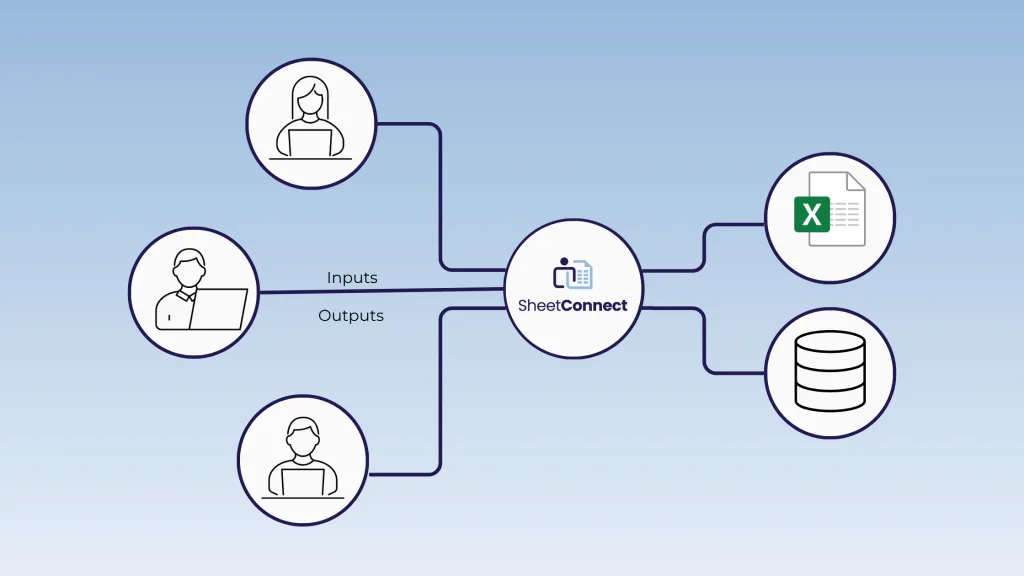
SheetConnect was built to create a more connected workflow where people, spreadsheets, and business systems operate together smoothly.
Why We Built SheetConnect
Spreadsheets are powerful and familiar, but they were never designed for growing teams or complex operational needs. Files get copied, versions duplicate, and data ends up scattered across shared drives and email threads. Even cloud storage and collaborative editing cannot fully address the risks of uncontrolled changes or inconsistent workflows.
Explore this further in our post on EASA vs. Sharepoint.
SheetConnect solves these problems by giving organizations a controlled, reliable way to share spreadsheets at scale while keeping logic, structure, and data unified. It creates a place where people can work with the spreadsheets they rely on while ensuring everything stays consistent across the systems that run the business.
What Makes SheetConnect Different
Most tools that attempt to modernize spreadsheet workflows require teams to invest significant effort before they can even begin using them. You often have to rebuild your logic, redesign your interface, or configure custom components just to recreate what your spreadsheet already does. Complex formulas, macros, or add-ins rarely translate cleanly, which leads to even more rework.
SheetConnect takes a different approach.
You keep the spreadsheet that already works. Every formula, macro, and add-in stays intact. There is no redesign, no custom interface to build, and no rework required. SheetConnect adds the governance, security, and scalability needed to use your spreadsheet safely across the organization while preserving the exact behavior your teams rely on.
Watch a demo to see SheetConnect in action.
What SheetConnect Does
SheetConnect creates a secure and consistent connection between people, spreadsheets, and business systems.
Secure Access Through a Browser
Users only see the spreadsheets they are authorized to use, and each session starts from a clean, controlled master file stored on your network or in the cloud. This keeps access aligned with your internal governance and compliance requirements.
Full Excel Logic with Zero Rebuild
Your existing formulas, macros, VBA, add-ins, and validation rules remain fully intact. SheetConnect preserves the original logic so regulated workflows and validated models remain unchanged.
Controlled Saving and Centralized Data
SheetConnect maintains a single master spreadsheet that users never download or save locally. Every instance begins with a secure browser session of that master file, and all data is saved back to a central database. This prevents uncontrolled copies, stops files from circulating through email or shared drives, and ensures everyone always works from one trusted source.
Connected Data Across Systems
SheetConnect integrates with systems such as Salesforce or SQL databases so data stays synchronized, traceable, and compliant across your organization. People work in spreadsheets while your systems remain aligned behind the scenes.
Learn more about the Importance of Data Integration.
Version Control
SheetConnect stops spreadsheets from being copied, downloaded, or saved in uncontrolled locations. Users work in controlled sessions rather than passing files around, which prevents duplicates from spreading through email, desktops, or shared drives
Learn more about the hidden risks of sharing spreadsheets through email
Built for Enterprise Security and Compliance
SheetConnect provides a governed environment for spreadsheet-driven work. Access is controlled at the user and spreadsheet level, ensuring people only see the tools and data intended for them. Every session is logged, every interaction is auditable, and sensitive spreadsheet logic stays protected inside your environment. These controls help organizations reduce risk, support compliance requirements, and manage spreadsheet use with confidence.
Read our customer success story to learn why LeasePlan says “EASA is the only tool we were able to find that can fully address Governance, Risk, and Compliance issues of spreadsheets.”
Ideal Use Cases
SheetConnect is designed for teams that depend on complex spreadsheets and need to share them safely across people, departments, and systems. Common applications include:
- Pricing tools
- Financial models
- Underwriting and risk calculators
- Engineering and technical tools
- Project estimators
- Loan and policy calculators
- Any workflow that requires consistent access to shared spreadsheet logic
Learn More
SheetConnect helps organizations create a more connected environment where people, spreadsheets, and systems work together with accuracy and control. To explore whether it is right for your workflow, visit our website or request a personalized demo.