
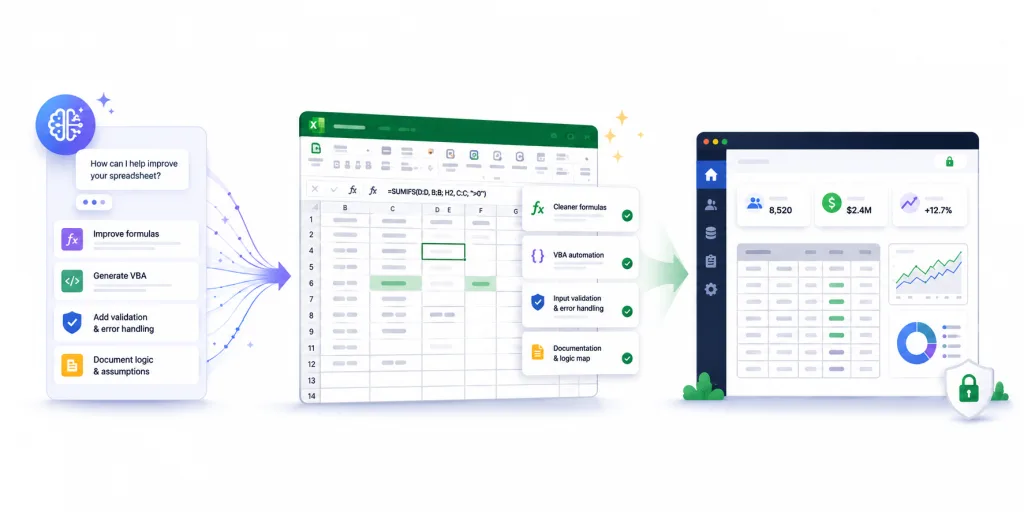
Most of the AI conversation around Excel predicts its replacement. Meanwhile, the people who actually build spreadsheets are using AI to make them better than ever. AI assistants now write and explain formulas, generate VBA, suggest error handling, and document logic that has gone unexplained for years. Microsoft ships Copilot inside Excel itself, complete with an Agent Mode that carries out multi-step spreadsheet tasks, and assistants like Claude and ChatGPT handle the rest from a browser tab. If you own a business-critical spreadsheet, AI gives you a faster path to a cleaner, stronger model than you have ever had.
A stronger model creates a new question, though. The better your spreadsheet gets, the more people want to use it, and the more it matters how you deliver it. This post covers both halves of that equation: how to use AI to improve the model itself, and how to wrap the result as a secure web application so the improvements reach your users safely.
How AI Strengthens Your Spreadsheet Logic
The most immediate win is understanding what you already have. If you inherited a model from someone who left the company, you can paste a dense nested formula into an AI assistant and get a plain-English explanation of what it does, including the edge cases it handles and the ones it misses. Work that once required hours of reverse engineering now takes minutes.
From there, AI helps you improve the logic itself. You can refactor sprawling nested IF statements into cleaner modern functions, replace fragile hardcoded values with named ranges, and restructure lookup chains that have grown brittle over years of patching. AI assistants also write solid first drafts of VBA, which puts automation within reach for model owners who never learned to code. Agent Mode extends this by executing multi-step changes you describe in plain language, Python integration opens analytics that formulas alone never reached, and Excel’s machine learning forecasting predicts demand or expenses from your historical patterns.
Error handling improves quickly too. You can ask an AI assistant to identify where your model breaks on unexpected inputs, then add validation and graceful failure messages in places that previously returned cryptic errors or, worse, silently wrong numbers.
Documentation rounds out the list. AI generates clear descriptions of your model’s assumptions, inputs, and calculation flow, which converts undocumented tribal knowledge into something your team and your auditors can actually read.
Test Everything AI Suggests
A note of caution: AI assistants produce confident suggestions, and some of those suggestions are wrong. Before any AI-generated formula or refactor goes into production, run your model against a set of known inputs and confirm the outputs match your validated results exactly. Treat AI as a skilled assistant whose work you review, since you remain accountable for every number the model produces. The good news is that AI also helps you build that test set, generating edge cases you might never have thought to check.
Why a Smarter Spreadsheet Raises the Stakes
Improving the model increases its gravitational pull. A spreadsheet that calculates faster, handles errors gracefully, and comes with real documentation attracts more users, feeds more decisions, and becomes more central to your operation. Every improvement raises the cost of the distribution problems that come with sharing a file: copies multiplying by email, users overwriting formulas, sensitive logic traveling to places you cannot see, and no record of who changed what.
Microsoft clearly recognizes the tracking problem, since Excel’s Show Changes view now flags edits made with Copilot. That attribution covers activity inside a single workbook, and the questions around the file itself, such as who can open it, which copy is current, and where it travels, still need an answer.
AI works on the inside of the file. The delivery mechanism around the file stays exactly as risky as it was before, and now it carries a more valuable asset.
Wrap the Improved Model as a Web Application
This is where the second half of the workflow comes in. EASA moves your spreadsheet to a secure server and gives users a browser-based application in its place. Every formula, macro, and lookup table you refined with AI stays intact, because the spreadsheet remains the calculation engine behind the app. Around it, you gain managed access, a single governed version, centralized data capture, and a full audit trail.
The pairing works because the two tools improve different layers. AI makes the logic stronger, and EASA makes the delivery safe. Your domain experts keep editing the model in Excel, with AI assistance, and every published update reaches all users at once instead of circulating as yet another file version.
A Practical Workflow from AI to Web App
Start by documenting what exists. Use AI to explain the current model, map its calculation flow, and surface assumptions nobody wrote down.
Then strengthen the logic. Refactor fragile formulas, add input validation and error handling, and clean up structure while AI handles the heavy drafting.
Validate before anything else changes. Build a test set of known inputs and confirmed outputs, and run it after every significant edit.
Deploy with EASA once the model is solid. Your improved spreadsheet becomes a secure web application without a rebuild, and your users get a clean interface instead of a file.
Keep iterating after launch. The model stays in Excel where you and your AI tools can keep refining it, and each improvement publishes to everyone the moment you release it.
Where EASA Fits
AI has made this the best time in years to invest in your spreadsheets. The models your experts built are getting easier to understand, easier to improve, and easier to document, which makes them more valuable than ever and more deserving of a delivery method that protects them.
EASA converts existing Excel spreadsheets, including those with VBA, macros, and add-ins, into secure web applications without altering the original file. You keep the logic AI helped you strengthen, and your users get controlled, auditable access to it from any browser.
If you are improving with AI, schedule a demo and see how the strongest version of your model becomes a web application